Etch is a serious, code-honest builder for people who already think in HTML, CSS and components, and its AI tooling is unusually open. It is also young, moving fast, and still has documented gaps (forms, WooCommerce, the custom-fields layer) that you should check against your project before committing. Judge it on a real build, not on the marketing.
Disclosure and how this review was made
Read this first. WPMusk’s own site is built with Etch and Automatic.css. That makes this a review of the tool we use by a publisher with an obvious interest in it, and you should weigh everything below with that in mind. We have no affiliate arrangement with the vendor and nothing in this article is paid placement.
This review is also not a benchmark report. WPMusk has not run controlled, hands-on performance or feature tests of Etch for this article. Everything factual here comes from the vendor’s own documentation, pricing pages, changelog and a small number of public third-party sources, all read in mid-November 2026. Where a claim comes from the vendor, we say so (“according to the documentation”, “the pricing page lists”). Where we could not verify something, we say that plainly and tell you how to check it yourself. Our opinions are labelled as analysis, and they are based on the documented design rather than on measurements.
Etch changes quickly. The changelog we read listed version 1.8.3 dated 13 November 2026, and the documentation pages were showing the same “last updated” date. Treat any detail here as a snapshot and re-check the linked pages before you buy.
Quick verdict: who Etch is for, and who it is not for
Etch calls itself a “visual development environment” rather than a page builder, and the documentation backs that up with a specific design philosophy: real HTML, CSS, PHP and JavaScript underneath, no hidden wrapper elements, and a visual canvas that edits the same code you could write by hand. If you are a freelancer, agency developer or technically minded site owner who likes components, design tokens and clean markup, that philosophy is the reason to look at Etch.
It suits you if:
- you already write or are willing to learn HTML and CSS, and you want a visual tool that does not fight you;
- you build many sites and want a reusable component and design-system workflow;
- you want your AI assistant to work inside the builder, either through its own built-in assistant or through an external coding agent;
- you like the idea of a block-editor-compatible output that clients can edit through the normal WordPress editor.
It is probably not for you if:
- you want a template-driven builder with a large marketplace of finished layouts and one-click add-ons;
- you need mature, built-in WooCommerce templates today (the vendor says a native WooCommerce integration is planned, see the e-commerce section);
- you want a large third-party add-on ecosystem comparable to the older builders;
- you are uncomfortable with a product that labels some of its own features experimental and publishes a “Known Issues” page and a “Current Priorities” page that says it is not a fixed roadmap.
The most useful single piece of advice in this review is the evaluation plan near the end: build one real page, with one real loop, one real component and one real client-editing handover, on your own hosting, before you decide.
What Etch is and who makes it
Etch is made by Digital Gravy. The company’s home page is signed by Kevin Geary as CEO, and the About page lists a team that includes a CTO, lead developers, a lead designer, developers and a support manager. The footer copyright reads “Digital Gravy” for 2026-2027. We were not able to find a longer corporate history on the pages we read, so we will not describe one.
The product now comes in two forms, and the vendor’s current homepage makes the split the headline:
- Etch for WordPress (EtchWP). The original product: a plugin plus a companion block theme that adds the visual environment to WordPress. The site describes it as “still in active development” and a continuing publishing destination.
- Etch Studio. “The same builder without WordPress”, hosted by Digital Gravy, with a built-in lightweight CMS, which compiles sites to static files and publishes them, with Cloudflare as the first and currently live destination.
The vendor’s tagline for the pairing is “consistency in how you build, flexibility in where you publish.” Both products share the builder, the skills and, according to the site, the templating language. They differ in where the finished site lives and what the platform behind it can do.
The homepage screenshot below shows the current positioning. Look at the headline (“One Builder. Multiple Platforms. Unlimited Possibilities.”) and the code-fragment decorations around it, which preview the template syntax used for loops, dynamic data and components.
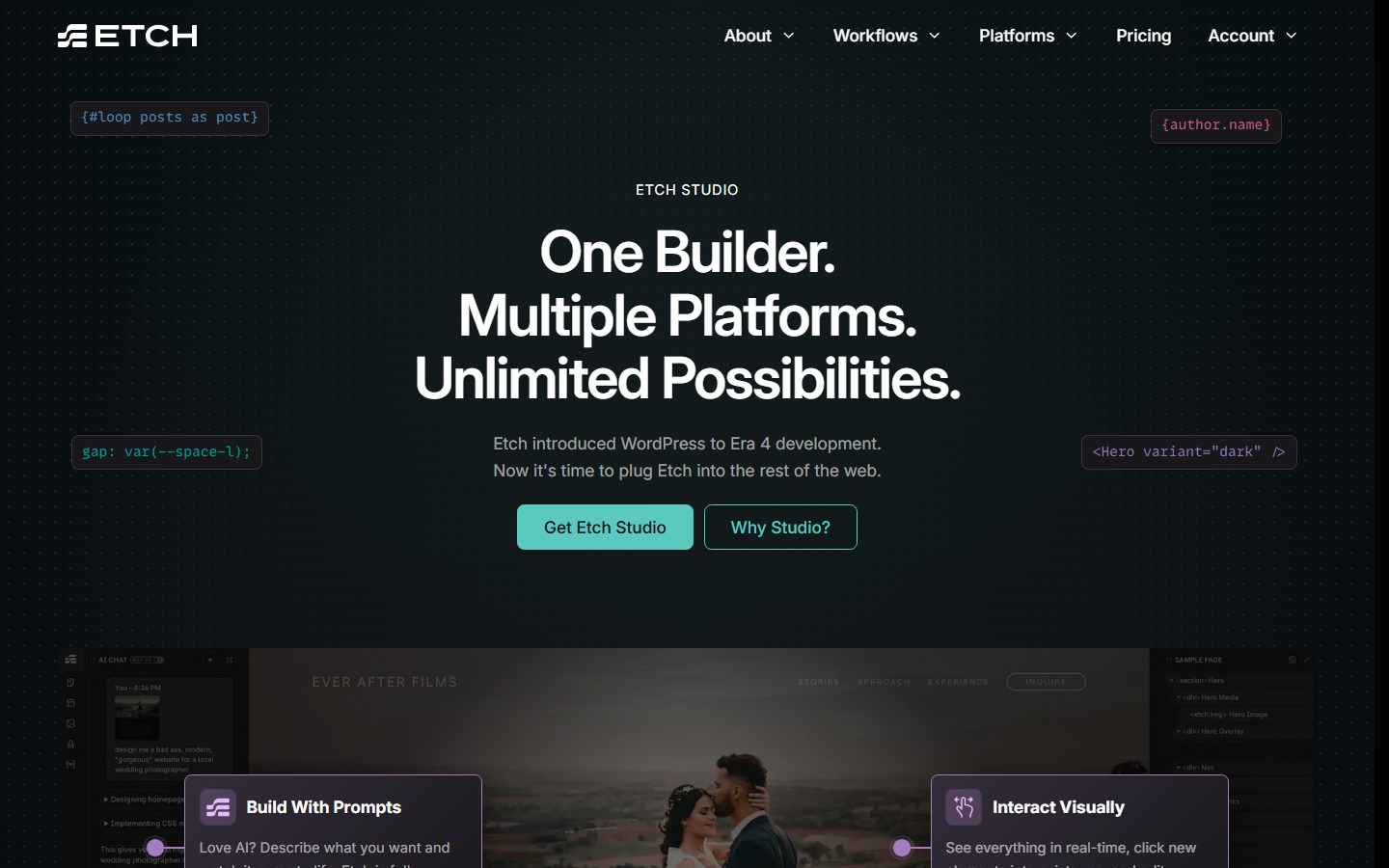
A note on addresses: the older etchwp.com address redirects to etchbuilder.io for marketing pages, while the documentation still lives at docs.etchwp.com and the EtchWP account area at account.etchwp.com. That is a sign of a product that recently reorganised itself around two platforms, and it is worth knowing when you search for documentation.
Key facts at a glance
The table below collects the verifiable basics. Every row is attributed to a vendor page we read. Where the vendor does not publish something, the row says so.
| Item | What the vendor’s pages say |
|---|---|
| Maker | Digital Gravy (Kevin Geary, CEO, per the homepage and About page) |
| Products | Etch for WordPress (EtchWP) and Etch Studio (WordPress-free, hosted platform) |
| EtchWP requirements | WordPress 5.9, PHP 8.1, WordPress memory limit 64 MB (128 MB recommended), per the Requirements page |
| Companion theme | Required: a minimal blank block theme (the Etch Theme). A free licence is claimed from the customer dashboard, per the Installation page |
| Browsers | Latest Chromium or WebKit recommended; Firefox “may have bugs”; Safari has known OKLCH colour rendering issues in the interface, per the Requirements page |
| EtchWP pricing | Freelancer $99/year (3 live installs), Agency $199/year (25), Agency Elite $299/year (75); unlimited dev installs on all three, per the pricing page |
| Studio pricing | $59/month, with an annual option labelled “Save 17%”; the Studio page lists $588 per year; unlimited sites, per the pricing and Studio pages |
| Lifetime deal | None for Studio, per the vendor (“no lifetime deal”); lifetime pricing for EtchWP is not mentioned on the pricing page |
| Output model (WordPress) | Gutenberg blocks authored automatically, so content stays editable in the block editor, per the docs welcome page |
| Output model (Studio) | Static files, no database, published to Cloudflare (live); FTP/SFTP listed as “soon”, per the Studio page |
| Built-in AI | Etch Intelligence, marked experimental, currently supports OpenAI only with your own API key, per the activation docs |
| External AI agents | Public API, an open-source Etch Connector npm package, and an Etch Studio MCP server, per the docs |
| Latest release seen | 1.8.3, dated 13 November 2026, per the changelog |
| Not published on pages we read | Refund policy, EtchWP renewal terms, whether EtchWP plans include Automatic.css, exact annual-plan fine print |
If you need to verify any row, the pricing page is on etchbuilder.io, the requirements and installation pages are under docs.etchwp.com/getting-started, and the changelog is at account.etchwp.com/changelog.
How Etch works: architecture, theme and output
On WordPress, Etch is a plugin plus a required companion block theme. According to the Etch Theme documentation, the theme supplies the hooks and structure needed for what the docs call Auto Block Authoring and Gutenberg compatibility, and nothing more. The same page warns not to switch themes during development or after launch, because doing so can lose layouts and content. It also takes a firm position that themes are an outdated architecture and that users should install the Etch Theme, avoid other block themes and move on.
That is a real constraint, and we flag it as analysis: if you are the kind of site owner who wants to pick a block theme, tune its theme.json and mix it with a builder, Etch tells you not to. Our own comparison of block themes is in best block themes for WordPress. Etch asks you to treat the theme question as already answered.
The documentation’s “Core Principles” page lists seven principles that explain much of the product’s behaviour:
- Honour web development fundamentals: HTML, CSS, PHP and JavaScript in standard form, so users learn real web development rather than a proprietary system.
- Never generate an element the user cannot access: no hidden wrappers or black boxes.
- Do not rescue users from themselves: the tool offers education and validation rather than guard rails.
- Do what is right, not what is easy.
- Do what is effective, not what is popular.
- Default styles must have zero specificity, so they are trivial to override.
- Make things easier without compromising: visual tools for loops, conditions and components should not produce poor code.
Principle six is a technically meaningful promise. If Etch’s default styles really sit at 0,0,0 specificity, your own CSS wins without an arms race of selectors. You can check that claim yourself in the browser’s inspector on a test page, which we include in the evaluation plan.
Content built in Etch on WordPress is stored as Gutenberg blocks. The docs say that supports client editing, since the client edits through the regular editor. The docs do not (on the pages we read) spell out exactly how much of a complex layout a client can safely edit, so test that handover rather than assuming it.
Under the hood, the editor also exposes a typed public API on window.etch. The documentation describes it as experimental (contract version 0.x), and it is the foundation for the AI integrations discussed later. Changes made through it go through the same guarded paths as the user interface, so undo and redo still work.
For readers new to the platform, our introduction in what is WordPress covers the basics Etch builds on, and block editor basics explains the editor that your clients will actually see.
The editing experience
The vendor describes three ways to work in the same environment: build with prompts, interact visually, and code it up. In practice that means a canvas where you click elements, a structure panel, an HTML editor and a CSS editor, with an AI chat available in the sidebar. The documentation lists the interface as modular, and a “Mini GUI” for styling that the Known Issues page calls “still in early form” but says already works better than traditional styling panels. That is the vendor’s opinion, so test the styling panel on your own machine.
The pricing page screenshot below shows the vendor’s own plan presentation. Look at the switch between Etch Studio and EtchWP at the top, which is how the company frames the choice, and at the Studio plan card with the “Top Option” ribbon.
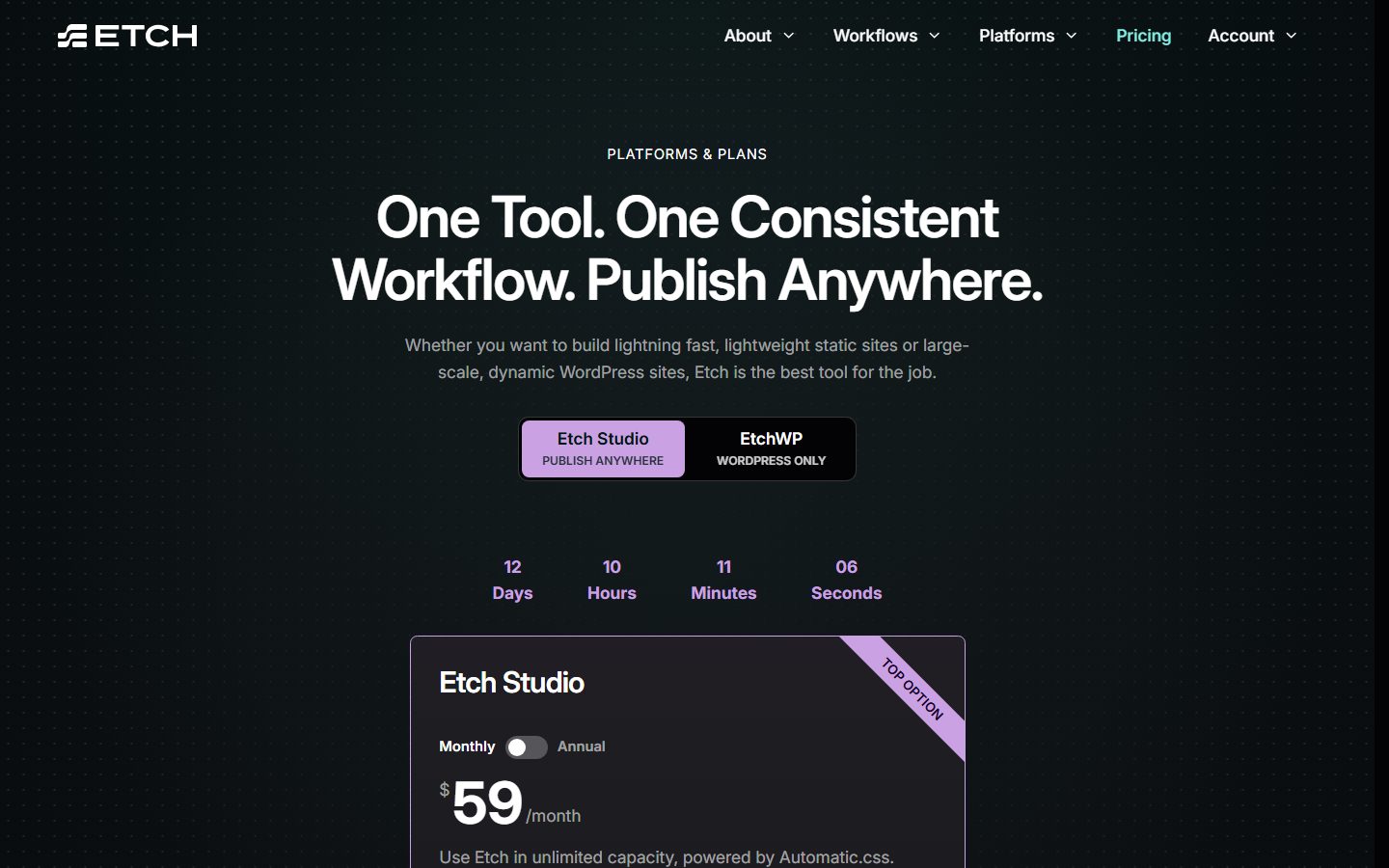
A few documented editing behaviours worth knowing:
- HTML editor with real markup. You can write the markup directly. The docs describe a Svelte-inspired templating syntax for loops and conditions, for example
{#loop posts as post}and{#if}blocks. - Selectors on debounce. The Known Issues page warns that typing slowly in the HTML editor can leave stray partial selectors in the style manager, and recommends the add-attribute bar for classes.
- Fifteen elements. The elements overview lists Anchor, Condition, Container, Div, Dynamic Image, Element, Empty Elements, Heading, Html, Iframe (marked work in progress), Image, Loop, Section, Svg and Text.
- Browser sensitivity. The interface uses modern CSS such as
color-mixand relative colour syntax, which is why the vendor recommends Chromium or WebKit browsers and warns about Safari colour shifts in the interface.
Design system: classes, variables, utilities and Automatic.css
Etch’s styling model is class-based. The AI documentation describes generated CSS using flat BEM selectors, and the design-system story leans on CSS custom properties: the homepage shows gap: var(--space-l); as an example. The Public API exposes a styles namespace for CSS rules and :root custom properties and a stylesheets namespace for global stylesheets and @custom-media definitions. Under “Utilities” the docs list functions and recipes. The docs also state that recipes began in Automatic.css and have been merged into Etch core.
That last point leads to the relationship we should be careful about.
Automatic.css and Etch: what we could verify
Automatic.css (ACSS) is a CSS framework for WordPress builders. WPMusk uses it, and we have a separate explainer in our Automatic.css framework guide. Here is what the vendors’ own sites say about the relationship:
- Etch’s pricing page says the Studio plan includes “Automatic.css (ACSS) pre-installed”, and the plan card says Studio is “powered by Automatic.css”.
- The Etch homepage says any framework can be used, or none, and that Automatic.css is optional.
- The Etch documentation describes an ACSS “skill” in the public API that is only exposed when Automatic.css is installed, and says ACSS users can skip some manual tutorials, for example global heading styles, because ACSS manages them.
- According to an excerpt of the Automatic.css documentation returned by a search of docs.automaticcss.com, Etch is listed first as the flagship integration and its setup page describes a zero-configuration pairing, and describes Etch as the official page builder from Digital Gravy, the team behind Automatic.css. We could not open that documentation page directly during research (the fetch failed), so confirm the wording yourself at docs.automaticcss.com under Setup and Builder Configuration.
What we could not verify: whether Automatic.css is included in any EtchWP plan (the pricing page does not say), what Automatic.css costs on its own today, and any licence terms for the pairing. Automatic.css is a separate product with its own site and licence, even though it comes from the same ecosystem. Ask the vendor or check both pricing pages before you assume one purchase covers both.
Analysis: the pairing is sensible if you value a ready-made token system (spacing scale, typography scale, colours) and want your AI assistant to follow the same conventions. It also means evaluating Etch honestly requires evaluating it both with and without a framework, because the documentation explicitly supports both.
Components, props and variations
Etch has two layers of reusable building blocks, and the docs keep them separate. “Native Components” are built-in interactive pieces (the documentation has its own section for them, though the pages we read did not list them, so check the overview for the current set). “Custom Components” are yours.
According to the Custom Components introduction, a component is a reusable, self-contained block that handles one part of a site, for example a header, footer, product card, call-to-action area or button. Editing a component updates every instance, which the docs call a single source of truth. The docs are careful to say components are not templates.
Props are the interface of a component. The introduction gives two examples:
- a text prop such as
serviceNamefills the heading of a service card, so each instance shows a different service; - a boolean prop such as
onSalecan drive a condition element that shows or hides an “on sale” badge, which is how the docs describe building variations.
The docs also mention data props and variants as later topics, and link a Slots page. We did not read the Slots page, so we will not describe how slots work. The public API’s components namespace exposes component definitions and their properties, and a changelog entry (1.7.1) mentions components.updateAsync() accepting authoring JSON. A later release adds a {component} dynamic data scope, according to the changelog excerpt we found.
Analysis: the prop and condition model resembles component frameworks in the JavaScript world, which is deliberate. If you have used any component-based tool, the mental model will feel familiar. If you have only used section-and-widget builders, expect a learning period. What to test: build a card with two text props, one boolean prop and one image prop, drop it into three places, then change the card once.
Dynamic data, loops and conditions
This is the part of Etch most likely to decide whether it fits a content-driven site, so we read the relevant docs pages carefully.
Loops
Loops are a dedicated Loop element. The documentation lists four loop data sources:
- WP Query, for posts or custom post types;
- JSON, static or dynamic;
- WP Terms, for taxonomy terms such as categories and tags;
- WP Users, for WordPress users.
The markup form is {#loop loopName as item} … {/loop}, and child elements read the current item’s data through keys such as {item.title}, {item.excerpt}, {item.permalink.relative} and {item.featuredImage.url}. Dynamic data also works inside attributes, so aria-label="Read {item.title}" is valid. You can get the index with a second variable ({#loop recentPosts as post, index}, starting at 0), and inline loops over a literal array are supported, for example {#loop [1,2,3,4,5] as item}.
The loops page includes a useful accessibility-minded tip: loop the <li> rather than the <article> to keep valid list markup.
Query configuration lives in a Loop Manager. On regular pages a custom query is required, while on templates the main query often runs automatically. Example WP Query arguments in the docs include post_type, posts_per_page, orderby, order and post_status.
Two honest limitations appear on that same page and in the priorities list. First, a loop with no items renders nothing, and the documented workaround for a “no results” message is a second loop that runs when the first returns zero results; the page says a more official method is planned. Second, the “Current Priorities” page says a new Data Sources system “will replace the Loop Manager”, and that facets and filters for loops are coming soon. If your project depends on filterable archives today, check the Facets section of the docs (the navigation lists a Facets section starting with pagination) and verify it covers your case.
Dynamic data and custom fields
The dynamic data introduction is conceptual: content comes from various sources and shows through templates and components, with the example of one service template and one card component inside a loop. The pages that hold syntax (keys, modifiers, integrations) are separate. From the changelog we can see modifiers exist, for example isTruthy and isFalsy added in 1.6.8, along with a tr; shortcut for to-rem.
For custom fields, the Integrations page names Advanced Custom Fields: its data is available under a this.acf namespace, while most other custom-field plugins are reachable through this.meta. Related loop pages cover repeater, relationship and gallery fields and ACF flexible content.
Etch also has its own content layer. Built-in AI can register custom post types and create field groups, and the platform has a Content Hub. The Known Issues page is blunt about it: the Content Hub for custom post types and custom fields is “still a functional proof of concept”, and the docs advise treating it as “more of a playground” than a core workflow unless your needs are basic. We recommend taking that at face value on WordPress sites and using ACF or a dedicated fields tool for anything structural. In Etch Studio the picture is different, because there is no WordPress database and the built-in CMS is the data layer.
Conditions
Conditions use {#if}{/if}, with a Condition element that writes the code for you. The docs list common patterns: showing a featured image only if one exists, an author bio only if present, a “Read More” button only if an excerpt exists, login and logout links by authentication state, a “New” badge for posts from the last seven days, and premium-content gating. The operators themselves live on the Basic and Advanced Conditions pages, which we did not read, so we cannot list them.
| Capability | Documented in Etch | What to verify yourself |
|---|---|---|
| Query posts and CPTs | WP Query loops with standard arguments | Your exact query (meta queries, multiple taxonomies) |
| Taxonomy and user loops | WP Terms, WP Users sources | Large taxonomies (changelog 1.6.5 mentions improvements) |
| External or static data | JSON source | Dynamic JSON from a real endpoint |
| ACF fields | this.acf namespace; repeater, relationship, gallery pages | Your actual field types |
| Pagination and filtering | Facets section; pagination listed | Filtering behaviour on your archive |
| Empty states | Workaround documented, official method planned | Whether it is acceptable for your design |
| Conditions | Condition element, {#if} | The operators you need |
Forms, WooCommerce and other integrations
Forms
The EtchWP docs we read do not describe a built-in form builder, and the Integrations page names no form plugin, so on WordPress you would most likely pair Etch with a forms plugin of your choice and confirm that its output works inside Etch markup. We could not verify a specific form integration, so test the one you plan to use.
Etch Studio is clearer. Because Studio builds static sites, the Forms documentation says submissions go to an external service. The three documented approaches are embedding a provider’s form (for example Tally or Google Forms), building your own form and posting to a backend such as Web3Forms, or posting to a webhook that an automation platform (Make is the recommended option, along with Zapier, Pipedream and n8n) forwards to your CRM, Slack, Sheets or email. The page warns that endpoints are public, so never place secrets in a form. That is a perfectly workable model for marketing sites, but it is a different model from “forms plugin with entries inside WordPress”.
WooCommerce and e-commerce
This is the area where the vendor’s own statements are mixed, so read them carefully:
- The pricing page lists “WooCommerce integration” as included on all three EtchWP plans.
- The homepage says EtchWP can build e-commerce sites today, and that a native WooCommerce integration is planned for EtchWP.
- The homepage says Etch Studio cannot publish directly to Shopify yet, and that WordPress is needed for WooCommerce or SureCart style e-commerce.
- The Current Priorities page we read does not mention WooCommerce.
Our reading: you can build WooCommerce front ends with Etch’s loops, dynamic data and your own markup, but a polished native template set is described as planned, not finished. We cannot tell you what the “WooCommerce integration” on the pricing page covers precisely, so that is the first thing to ask the vendor or test on a staging shop. For store-level decisions that do not depend on the builder, see WooCommerce alternatives and the product-page and checkout guides on this site.

SEO plugins
The changelog is the most informative source here. Release 1.7.0 says Yoast SEO and Rank Math analyse rendered Etch content, including dynamic content, with image sitemaps including Etch-rendered images. Release 1.8.1 says SEOPress analyses rendered Etch content for excerpts and image and video sitemaps. Release 1.8.3 says Slim SEO and Slim SEO Pro read rendered Etch content for descriptions, schema, content analysis, link tools and image sitemaps. That is specific, dated, vendor-reported evidence, and the type of integration that matters when a builder stores layout outside classic post content.
Other integrations
The documentation also lists Controls, Custom Fields and Hooks sections under Integrations, and a Gutenberg section about block authoring. The vendor mentions SureCart in its documentation for licence handling (the free theme licence is found in a SureCart dashboard). We found no documented marketplace of third-party add-ons comparable to older builders, so plan on using standard WordPress plugins and your own code for functionality.
AI features and automation
AI is central to Etch’s current marketing, and it is also where the claims need the most care. There are four distinct things, and it helps to keep them apart.
1. Etch Intelligence (the built-in assistant)
According to the documentation, Etch Intelligence is an in-editor assistant with two modes: Ask (answers and explanations, no changes) and Build (creates and changes things). In Build mode, the docs say it can:
- generate HTML in Etch’s templating syntax, CSS with flat BEM selectors and minimal vanilla JavaScript;
- create loop definitions, register custom post types, create custom fields and field groups, create posts and pages and insert data;
- access the media library, read blocks on the current page and find existing posts, post types and loops;
- accept pasted or dropped screenshots, mockups and CSV files up to 10 MB each, including bulk-populating posts or fields from a CSV.
You can add specific canvas elements to the AI context with a sparkles button or the right-click menu, so the model knows what you are pointing at. The vendor’s AI-First page offers an example of a team-directory CSV turning into a custom post type with a field per column and 27 posts. That is a vendor example, and we have not reproduced it.
Important documented constraints: the page calls Etch Intelligence experimental and advises you to review generated code and structural changes. According to the activation page, OpenAI is the only supported provider today, you supply your own API key (Settings, Experimental tab), usage is billed by OpenAI separately from any ChatGPT subscription, and the page does not name a model. It says the vendor plans more providers and a natively trained model offered through a subscription. The page says nothing about what data is sent to OpenAI or how it is retained, so if you handle client content with confidentiality obligations, read OpenAI’s own terms and ask the vendor.
One tension is worth naming. The marketing pages say “No Model Lock-in” and “Bring Your Existing Keys”, and the AI-First page mentions “Tuned Models”. The activation documentation says OpenAI only for the built-in assistant. We read these as different layers: the built-in assistant is OpenAI-only for now, while the external-agent route (below) is model-agnostic because you choose the agent. That is our interpretation, so confirm it with the vendor if it matters to your purchase.
2. The Public API and Etch Connector (external coding agents)
The Public API is a typed scripting interface on window.etch. Its documented namespaces include blocks, styles, stylesheets, components, assets, loops, navigation, fields, ui and history, skills and ai. Some changes are buffered until saveAsync(), while stylesheets, components, fields and assets persist immediately. It is experimental (contract 0.x) and the docs recommend feature detection rather than pinning production code to 0.x.
The Etch Connector is the bridge. According to the docs, it is a free, open-source npm package (@digital-gravy/etch-connector) that lets an AI coding agent such as Claude Code or Codex work in a live builder tab. You start it with npx, click the AI sparkles button in the builder, paste the connector command into your agent, and the agent runs small scripts against the Public API. Requirements implied by the docs: an open builder tab with the AI Connector on, an agent that can run commands on your machine, and Node. The changelog adds that version 1.8.0 extended the connector with media-library asset management.
The docs also describe “skills”, bundled read-only authoring guides, and say an ACSS skill appears only when Automatic.css is installed. That is a concrete mechanism for steering an agent to your conventions.
3. The Etch Studio MCP server
For Studio, the documentation has an MCP Server section marked new. It describes a remote HTTP MCP server at https://studio.etchbuilder.io/mcp. Claude on claude.ai or desktop can add it as a custom connector, Claude Code can add it with claude mcp add --transport http, and other clients can use it as a remote MCP server; you sign in with your Studio account. Documented tools are list_projects, open_project, request_control, get_guide, eval, screenshot and close_project.
The behaviour described is careful about concurrency: only one builder has editing control at a time, and the assistant can request control (about 30 seconds to respond, after which control passes to the assistant and the other tab’s unsaved changes are discarded). Page structure and styles are saved only on save, the builder shuts down after about ten minutes of inactivity and unsaved changes are lost, and the page says the server is at an early stage so tools may change.
4. What we did not find
- The Etch Connector page and the marketing AI pages do not mention MCP. The MCP server is documented in the Studio section. For EtchWP, we found no official MCP server. A third-party directory lists community and commercial MCP projects for Etch (for example an extension called Etch Agent Bridge, and an MCP page from Novamira), but those are not vendor-maintained, and you should vet them like any plugin (how to vet a WordPress plugin before installing applies).
- We found no published benchmark of output quality from any model. “Anti-slop” and “consistently outputs clean code” are vendor claims, not measurements.
Analysis: the strength here is architecture. Because the assistant works through the same API the interface uses, with undo and history intact, and because the output is real markup, a reviewer can read what the AI did. The caution is maturity: experimental flag, single provider for the built-in assistant, 0.x API contract. Our evaluation plan includes a specific AI test.
Etch Studio versus Etch for WordPress
This is the decision most readers will face first, so it deserves its own section. According to the vendor, it is the same builder with different destinations, and the table summarises what the vendor’s pages say.
| Question | EtchWP (WordPress) | Etch Studio |
|---|---|---|
| Where the site lives | Your WordPress hosting | Static files on Cloudflare (live); more destinations planned |
| Database | WordPress database | None; built-in lightweight CMS compiles to static files |
| Plugins | The WordPress plugin ecosystem | Not applicable; forms and extras use external services |
| Logins, membership, WooCommerce | Available through WordPress | Vendor says WordPress is needed for these |
| Client editing | Via the block editor | Vendor says supported on both platforms (details not on the pages we read) |
| Licensing | Annual plans by number of live installs | Subscription, unlimited sites |
| Feature order | Ported after Studio, no timeline given | New features built here first, per the vendor |
| Hosting cost | You pay your host | Vendor says Cloudflare’s free plan covers most sites; hosted platform is part of the Studio subscription |
Two statements deserve attention. First, the vendor says Studio can handle roughly 80 to 85 percent of agency and freelance sites, and that new features are built in Studio first then ported to EtchWP. We cannot assess either number, and the second is a roadmap signal worth weighing if you are choosing EtchWP: the vendor also says EtchWP is in active development and that nothing users rely on today goes away. Second, the Studio page describes future one-click migration between Studio and WordPress as “planned”, so do not assume you can switch later without rebuilding.
Front-end output, performance and SEO
Etch’s performance story is architectural rather than numerical. The pages we read make these claims and give no measurements:
- Output is real HTML and CSS with no hidden wrappers (Core Principles).
- Default styles carry zero specificity, so overrides are cheap.
- Responsive behaviour uses container queries by default, with no global breakpoints (Responsive Development).
- Studio sites are static files served from Cloudflare’s edge network, with no database (Studio page, which cites 300+ edge cities).
- The changelog reports builder performance improvements on large pages (1.6.8) and an opt-in
lazy-oncemode for structure rendering (1.8.2).
We found no published Lighthouse, Core Web Vitals or page-weight figures for Etch on the pages we read, so we are not going to give you any. Clean markup is a plausible advantage, but the same builder can still produce heavy pages if you add large images, many web fonts or heavy scripts. Hosting, caching and images usually matter at least as much as the builder, which is why our general guides on WordPress speed optimisation, caching plugins and Core Web Vitals (LCP, INP, CLS) apply to Etch sites as much as any other, and the PageSpeed Insights guide explains how to read your results.
How to test yourself: build the same landing page in Etch and in your current builder, serve both from the same host with the same caching, and run PageSpeed Insights several times on each in mobile mode. Record page weight, number of requests, LCP element and INP in your own field data if you have it. The evaluation plan below turns this into pass and fail criteria.
For SEO, the strongest evidence is the integration list above: Yoast, Rank Math, SEOPress and Slim SEO are all documented as reading rendered Etch content. Check that your preferred plugin appears in the changelog and test its content analysis on a page that uses a loop and a component, since dynamic content is where builders typically trip analysis tools. For hosting choices that fit a code-forward builder, see best WordPress hosting by use case and managed versus VPS hosting.
Accessibility and responsive control
Etch’s documented stance on accessibility is that good semantics come from writing real HTML. The loops documentation recommends valid list markup, attributes accept dynamic values (so labels can be generated), and the vendor claims its AI agent “follows best practices for accessibility and maintainability” and uses semantic HTML. Those are intentions and claims, not certifications. We found no accessibility conformance statement, so audit your own output with a tool and a keyboard before launch.
Responsive design is a distinctive part of the model. The documentation says Etch is container-query-first, has no global predefined breakpoints and lets each component or block define its own responsive behaviour based on its context, with examples like a card changing at 412px and navigation at 322px. The page did not discuss fluid sizing, though the homepage refers to a “Fluid Responsive Canvas” and Automatic.css supplies fluid scales. If your team is used to a global “tablet” and “mobile” toggle, this is a mental shift, and a good one if components are reused in different widths. Test it by placing the same card component in a sidebar, a three-column grid and a full-width section.
Learning curve, documentation, support and community
The documentation is broad: getting started, interface, elements, native and custom components, templates, dynamic data, loops, conditional logic, facets, responsive development, utilities, Gutenberg authoring, how-to guides, Etch Intelligence, the Public API, the Etch Connector, integrations, troubleshooting, migration guides, known issues, current priorities and feature flags. That is a lot of surface, and the transparency is a plus: the Known Issues and Current Priorities pages say what is unfinished.
The gaps we noticed while researching, as analysis:
- Several pages are conceptual introductions, with the syntax on subpages.
- The EtchWP and Studio documentation are separate, so you need to know which you are reading.
- The product is evolving: a v1 migration guide covers moving from pre-alpha, alpha and beta builds to 1.0.0, with the warning that skipping intermediate versions “may result in incomplete migrations or data loss”. Etch is now at 1.8.x, but this history shows how recently it stabilised.
Support: the EtchWP plans list priority email support and community access. The vendor runs a customer community (community.etchwp.com), a YouTube channel (@buildwithetch) and a support team, according to the footer links and About page. We did not verify response times, so ask about them if support matters to your agency. Education is also part of the pitch: the company’s founder is described on the docs as having taught web development to tens of thousands of people, and the team commits to free teaching for those lacking the skills.
Learning curve, our judgement: if you know CSS, expect a short ramp, then a longer one for the templating syntax, components and loops. If you do not know CSS, plan real learning time, because the interface expects it.
Pricing and licensing explained, with a multi-year cost model
All prices below come from Etch’s pricing and Studio pages as we read them in November 2026. The pricing page showed a countdown timer without describing the offer behind it, so treat the figures as the displayed prices and re-check them. The pages do not state renewal terms for EtchWP, so the multi-year numbers assume the displayed price stays the same each year, which is an assumption, not a vendor promise. Taxes, hosting and the cost of Automatic.css (where not bundled) are excluded.
| Plan | Displayed price | Live sites | 1 year | 3 years | 5 years |
|---|---|---|---|---|---|
| EtchWP Freelancer | $99/year | 3 | $99 | $297 | $495 |
| EtchWP Agency | $199/year | 25 | $199 | $597 | $995 |
| EtchWP Agency Elite | $299/year | 75 | $299 | $897 | $1,495 |
| Studio, annual | $588/year (Studio page) | Unlimited | $588 | $1,764 | $2,940 |
| Studio, monthly | $59/month | Unlimited | $708 | $2,124 | $3,540 |
Some arithmetic on those figures, with caveats:
- Studio annual versus monthly: $708 minus $588 is $120 a year, which is about 17 percent, consistent with the “Save 17%” label.
- Cost per live site per year if you use every slot: Freelancer $33.00 (99 divided by 3), Agency $7.96 (199 divided by 25), Agency Elite $3.99 (299 divided by 75). Few people fill every slot, so your real figure will be higher.
- Studio per site: with 10 sites on the annual plan it is $58.80 per site per year, and with 25 sites $23.52.
- Development and staging installs are unlimited on all three EtchWP plans, so the live-install cap is the number to watch.
What the arithmetic leaves out: EtchWP needs hosting for each site, and Studio’s hosting is part of the platform with Cloudflare’s free plan, as the vendor describes it. That could make Studio cheaper in total for many small sites, or more expensive for a single site that would fit on a shared host. Also unverified: whether EtchWP plans include Automatic.css (the pricing page does not say), whether the free theme licence needs renewal, the refund policy and what happens to updates and support at the end of a licence year. Ask these before buying.
Migration to and from other builders
We found no documented importer from Elementor, Divi, Bricks or other builders in the pages we read. The v1 migration guide is about upgrading between Etch’s own pre-release versions, not about other tools. In practice, moving to Etch means rebuilding templates and components in its model, and you can lean on its AI tools, which accept screenshots and mockups, to speed up the rebuild. That is a method suggestion, not a vendor claim.
Moving out of Etch on WordPress is easier to reason about than for most builders, in principle, because content is stored as Gutenberg blocks and the markup is standard. We would still test what your content looks like if the plugin were deactivated, since custom blocks and dynamic data behave differently without the plugin. For Studio, the vendor lists WordPress migration, to and from, as planned, which means no official path today.
Strengths and weaknesses (analysis)
These are our judgements, based on the documentation described above, not test results.
Strengths
- Philosophy and transparency. Real code, no hidden wrappers, zero-specificity defaults and a candid Known Issues page.
- A genuine component and loop model. Props, conditions, loops with several data sources, and attributes that accept dynamic data.
- Open AI integration. A public API, an open-source connector, a remote MCP server for Studio, and a built-in assistant, all working through one API with undo.
- Container-query-first responsive design. Components that adapt to where they are placed.
- SEO plugin work. Concrete, dated changelog entries for four SEO plugins.
- Pricing clarity for agencies. A live-install cap with unlimited development installs and prices published in full.
Weaknesses and risks
- Maturity. 1.x only recently, with an experimental AI assistant and a 0.x API contract.
- Custom-fields layer. The vendor’s own docs call the Content Hub a proof of concept, and a Data Sources system will replace the Loop Manager, so expect change.
- WooCommerce. A native integration is described as planned.
- Forms. No built-in form builder described for WordPress, and external services for Studio.
- Single AI provider for the built-in assistant. OpenAI only, with a bring-your-own-key model and unspecified data handling.
- Theme lock-in. The required companion theme comes with a strong “do not switch” warning.
- Ecosystem size. No documented marketplace of third-party add-ons.
- Vendor dependency for Studio. The hosted platform is run by Digital Gravy, with no lifetime option and a planned but unavailable exit path.
- Browser requirements. The interface prefers Chromium or WebKit, and Firefox may have bugs.
How Etch compares with other builders
For a systematic comparison across tools, use our page builders comparison guide. Below are brief factual contrasts, and each is based on the general design of those products as commonly documented, not on testing by us. Verify each against its vendor before deciding.
- Bricks, Breakdance and Builderius. WPMusk has in-depth reviews of these three as well. They are the closest in spirit: developer-friendly, code-aware builders. Etch differs by positioning itself as a visual development environment with its own templating language, a companion block theme and a second hosted product, Studio. See also Bricks versus Elementor for a related comparison.
- Elementor. A much larger ecosystem with widgets and templates, aimed at a wide audience. Etch trades that breadth for code transparency. If you are leaving Elementor, see Elementor alternatives.
- Divi. A template-and-module builder with a large community. Etch asks for more technical knowledge.
- Oxygen. Also developer-oriented, with its own approach to dynamic data and templates. Compare the licensing and the editing model side by side.
- Beaver Builder. Known for a simpler, stable editing experience. Etch is aimed at a different level of technical skill.
- Greenshift. Block-based, working inside the Gutenberg editor. Etch also outputs blocks, but through its own canvas.
- Plain block themes and the native editor. If your needs are modest, a block theme and the native editor may be enough, as covered in best block themes.
A one-day evaluation plan for your own site
Because we have not run hands-on benchmarks, here is how to produce your own evidence in one working day. Use a staging copy of a real project, not a demo.
- Set-up (45 minutes). Install the plugin and companion theme on a fresh staging WordPress that meets the documented requirements (WordPress 5.9, PHP 8.1, 128 MB memory recommended). Claim the free theme licence. Pass if you reach “Edit with Etch” without errors.
- Design tokens (45 minutes). Define colours, spacing and type as CSS variables, with and without Automatic.css. Pass if your tokens are easy to apply and a global change propagates.
- Component test (60 minutes). Build a card with two text props, one boolean prop and one image prop, and reuse it in three layouts. Change the card once. Pass if every instance updates and the markup is clean in the inspector.
- Loop test (60 minutes). Build an archive with a WP Query loop of at least ten posts, a taxonomy filter if you need one, an empty state and pagination. Pass if the markup is valid (list items in a list) and the empty and filter cases behave as you need.
- Custom fields (45 minutes). Use ACF or your fields tool to render a repeater and a relationship field. Pass if values display correctly without relying on the Content Hub.
- Forms and commerce (60 minutes). Embed your preferred forms plugin and submit a test entry. If you sell, build a product grid and confirm what you need for cart and checkout styling. Fail if the key flow requires work the docs describe as planned.
- AI test (60 minutes). Give the built-in assistant (if you are willing to supply an OpenAI key) or your own agent through the connector the same brief: a hero section using your tokens. Check whether it used your variables, produced semantic HTML and left an editable structure. Pass if you would be comfortable shipping its output after review. Record what data you gave it.
- Client handover (30 minutes). Log in as an editor role and change text, an image and a loop-driven item through the normal block editor. Pass if the client can edit without breaking layout.
- SEO check (30 minutes). Run your SEO plugin’s analysis on a page with dynamic content and confirm it sees the rendered text and images.
- Performance and accessibility (60 minutes). Build the same page in your current builder, run PageSpeed Insights at least three times each in mobile mode with the same caching, and compare page weight, request count, LCP and INP. Then run an accessibility checker and tab through the page. Pass criteria are yours, for example no regression against your current build.
- Exit test (30 minutes). Deactivate the plugin on staging and look at the front end and the editor. Record what survives.
Write the results in a simple table of pass, fail and “needed a workaround” for each step. If more than two steps fail on things you need in production, wait for a later release.
Who should choose Etch, and who should not
Choose Etch if you build with components and code, want a modern responsive model, value clean output and an open AI integration, and are comfortable with a product still maturing. Agencies with many sites should compare the live-install pricing carefully, and teams that want to avoid WordPress for simple sites should look at Studio.
Avoid Etch, for now, if you need a ready-made WooCommerce template set, a broad add-on marketplace, a built-in forms solution, or strict stability guarantees on every feature. Also avoid it if you or your clients cannot work with code at all, or if you cannot accept a required companion theme.
Frequently asked questions
Is Etch a page builder?
The vendor calls it a visual development environment rather than a page builder. It has a canvas and drag and drop, but it works on real HTML, CSS and JavaScript and exposes the code.
What is the difference between Etch Studio and EtchWP?
EtchWP is the plugin for WordPress, and Studio is a hosted version without WordPress that publishes static sites, currently to Cloudflare. See the comparison section above and the vendor’s own explanation on its homepage.
What does Etch cost?
According to the pricing page: EtchWP is $99, $199 or $299 per year (3, 25 or 75 live installs), and Studio is $59 per month or $588 per year. Check the page for current prices and any sale.
Is there a lifetime licence?
The vendor says there will be no lifetime deal for Studio. The pricing page did not mention lifetime pricing for EtchWP.
What are the requirements?
The documentation lists WordPress 5.9, PHP 8.1 and a 64 MB memory limit with 128 MB recommended, plus a required companion block theme. Chromium or WebKit browsers are recommended.
Do I need Automatic.css?
No. The vendor says any framework or none can be used. The Studio plan lists Automatic.css as pre-installed. We could not verify whether the EtchWP plans include it, and it is a separate product, so check both pricing pages.
Does Etch have AI?
Yes, in several forms: a built-in experimental assistant (OpenAI only, with your own key), a public API and open-source connector for external agents such as Claude Code, and an MCP server for Etch Studio. The vendor’s claims of clean, accessible output are not independently verified.
Does Etch have an MCP server?
For Etch Studio, the documentation describes a remote HTTP MCP server. For EtchWP we found no official one; third-party MCP projects exist and are not vendor-maintained.
Can clients edit sites built in Etch?
The documentation says content is authored as Gutenberg blocks so clients can edit it, and the vendor says client editing works on both platforms. Test the handover on your own layouts.
Does Etch work with WooCommerce?
The pricing page lists a WooCommerce integration on EtchWP plans, while the homepage says native integration is planned. Treat it as something to verify on a staging shop.
Does Etch work with my SEO plugin?
The changelog reports support for Yoast SEO, Rank Math, SEOPress and Slim SEO reading rendered Etch content. Check the current version notes for yours.
Is Etch fast?
The vendor claims clean output and, for Studio, static delivery from Cloudflare. We found no published measurements, and have not run our own. Use the evaluation plan and our guides on speed and Core Web Vitals to measure it for your own site; the speed up your site tutorial is a good companion.
How do I get started if I am new to building sites?
Start with launching your site and block editor basics, learn some HTML and CSS, then work through the Etch getting-started documentation. For a wider opinion piece on the tool, see our earlier Etch write-up.
This review is based on the vendor’s own documentation, pricing pages and other public sources. WPMusk has not published hands-on benchmark results for it yet, so there is no score.
← All reviews