
Builderius presents itself as a “visual development environment” for WordPress rather than a page builder in the drag-a-widget sense. Its documentation describes a tool where visual controls write real CSS properties, you choose the exact HTML tag for every element, dynamic data comes from GraphQL queries, and a staging workflow with commits and releases sits inside the editor. The pricing page lists three paid tiers sold as one-time lifetime purchases ($79, $169 and $229 at the time of writing) plus a free Community tier.
On the documented design, it looks best suited to three kinds of reader: front-end developers who are tired of builders that hide the markup, freelancers or small agencies who want a staging and handover process without paying a yearly licence, and people who like the idea of driving a builder from an AI client through the Model Context Protocol (MCP). It looks less suited to site owners who want to pick a template, swap the text and publish, to teams that need a large marketplace of ready-made designs, and to anyone who needs WooCommerce template building today, because the vendor’s own roadmap lists WooCommerce support as planned rather than shipped.
Two cautions run through this whole review. First, the current public release on WordPress.org is labelled 1.6-rc2, a release candidate, and the changelog for recent releases contains several security and caching fixes. That is not a reason to dismiss the product, but it is a reason to pilot it on a non-critical site first. Second, some pages of the official documentation are still placeholders (“Coming soon”), including the contact form and the menu builder. We say clearly below what we could and could not verify.
WPMusk’s own site is built with Etch and Automatic.css, so this review of a competing tool comes from a publisher that uses a different builder. We have no affiliate relationship with Builderius, and nothing in this article is sponsored.
WPMusk has not run hands-on benchmarks of Builderius for this review. Everything below is based on the vendor’s documentation at builderius.io, its pricing and support pages, its public changelog and roadmap, its WordPress.org plugin page, and a small number of third-party articles. Where a statement is a marketing claim, we attribute it as one. Where we offer an opinion, it is labelled as analysis, and it rests on the documented design rather than on measured results. Near the end there is a one-day evaluation plan so you can check the claims that matter to you on your own hosting.
Treat every number and feature in this article as “according to the vendor on the date of writing”. The pricing page itself says launch pricing ends on Cyber Monday, November 30, so the numbers will change within weeks of this article being published.
Builderius is a WordPress plugin that replaces the front-end output of selected locations on your site (front page, a single post template, an archive and so on) with templates you design in its own editor. The WordPress.org readme states that it works in its own environment, built with React, and is not a block builder. The plugin page says it was first published on December 4, 2019, and the project has a long public history, including a 2022 episode of the WP Builds podcast in which a Builderius representative described it as an “all in one development tool” rather than a typical page builder.
On who is behind it: the home page and support page list the company simply as “Builderius” with a 2026 copyright, a privacy policy, terms of use and a user account portal. The product pages we read do not name founders or a legal entity, and we could not verify the company’s size or funding. The 2022 podcast page names Volodymyr Denchyk as the person interviewed. If vendor continuity matters to your decision, and for a lifetime-licence product it should, ask the vendor directly.
The screenshot below is the vendor’s home page at the time of capture. Look at the headline, “Build with an Agent. Refine Visually. Deploy Anywhere.”, and at the editor strip underneath it, where you can see a version tracking panel and a Navigator with Elements, Selectors and CSS Vars tabs.
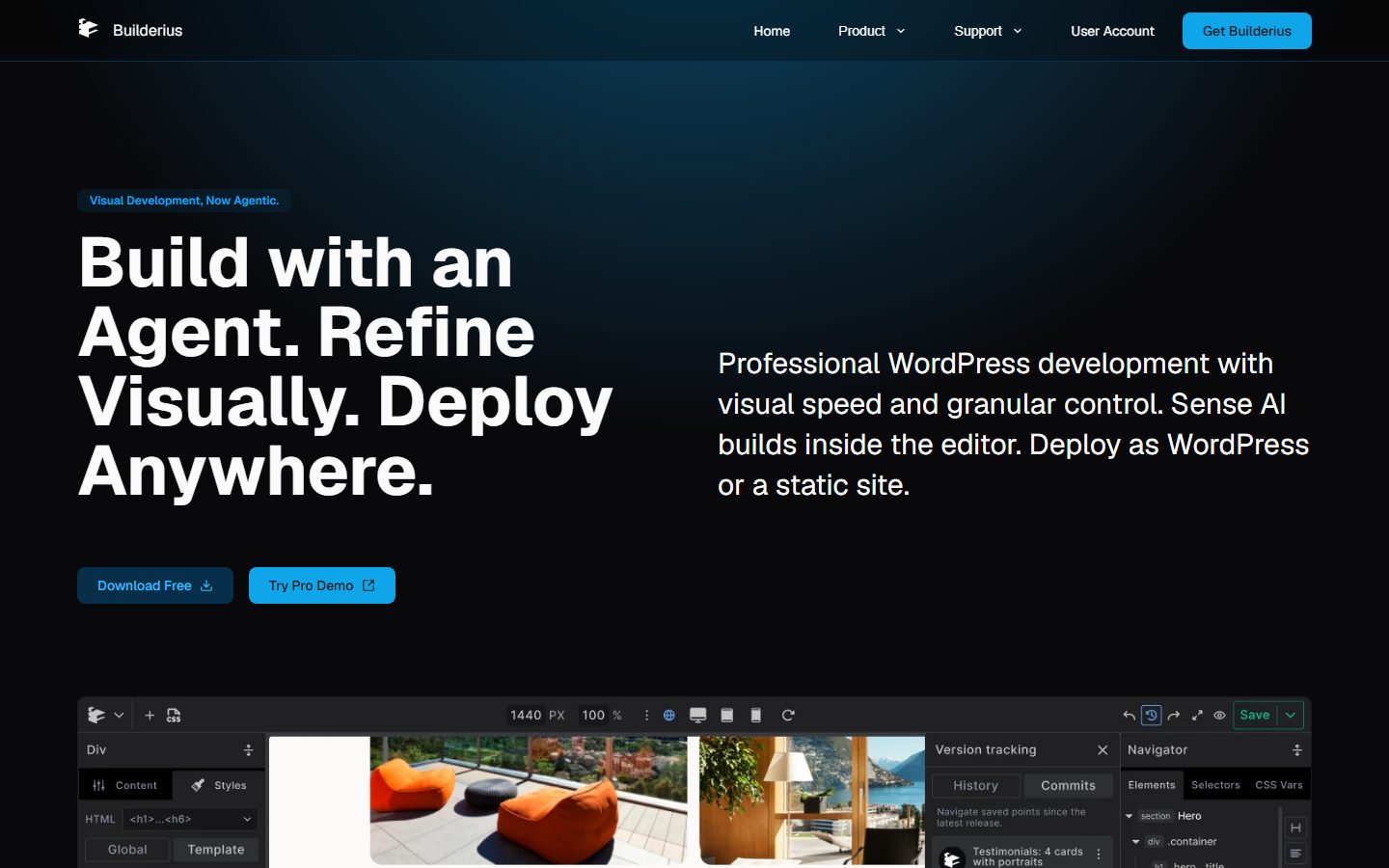
The positioning on that page is worth reading as marketing: “Professional WordPress development with visual speed and granular control. Sense AI builds inside the editor. Deploy as WordPress or a static site.” Sense AI is the vendor’s name for its AI integration, covered in its own section below.
The table gathers the facts we could verify on the vendor’s own pages or on WordPress.org. The right-hand column names the source so you can re-check each one.
| Item | What the vendor publishes | Source |
|---|---|---|
| Product type | Visual development environment and template builder plugin; not a block builder | Home page, WordPress.org readme |
| Current public version | 1.6-rc2 (release candidate); WordPress.org page shows last update November 11, 2026 | WordPress.org, changelog |
| PHP requirement | PHP 8.2 or higher | Docs requirements page, WordPress.org |
| WordPress requirement | Docs say 6.0 or higher; WordPress.org lists 6.4 or higher (the two disagree) | Docs, WordPress.org |
| Builder browser support | Latest Brave, Chrome, Firefox and Edge; Safari is not supported for the builder interface. Published sites work in all modern browsers including Safari | Docs requirements page |
| Free tier | Community, on WordPress.org, “free forever” for personal sites and blogs per the pricing page | Pricing page |
| Paid tiers | Website $79 (1 site), Professional $169 launch / $219 from December 1 (unlimited sites), Studio $229 launch / $299 from December 1 (unlimited sites) | Pricing page |
| Billing model | One-time payment; “No recurring fees, ever”; updates and support “for as long as Builderius exists” | Pricing page |
| Refund | 30 days; the FAQ says refunds equal 90% of the payment, the other 10% covering payment processor fees | Pricing page |
| Support | Community: WordPress.org forums and a Facebook group; paid tiers: priority tickets | Pricing and support pages |
| AI | Sense AI, an MCP connection to your own AI client; no separate Builderius AI key needed; Node.js 20+ needed on your machine | Sense AI docs |
| Static output | Static site generation with ZIP, GitHub Pages or Cloudflare Pages targets (listed under Studio on the pricing page) | Changelog, pricing page |
| Active installs on WordPress.org | “100+” (the free plugin); 16 reviews, all five-star | WordPress.org |
A review based on documentation should be honest about the documentation. These are the open points we found, and each one is something you should settle before you buy.
The documentation’s “Essential concepts” page describes three building blocks. Templates are reusable designs that cover an entire browser view; one blog post template can style hundreds of posts. Pages are unique, one-off designs such as a custom home page. Components are reusable parts used inside templates or pages, such as headers, footers and cards. The suggested starting workflow is a home page template, a blog post template, and reusable header and footer components, with individual pages only where a layout is genuinely unique.
The theme interaction is central to understanding the product. According to the themes page, Builderius works with classic, block and hybrid themes, and enabling Builderius for a location (the Front Page, Blog Page, a Single Post and so on) turns off the theme’s output for that location only. Other locations keep using the theme. The page recommends migrating one location at a time. With a block theme active, Builderius restores the classic Appearance, Menus screen in the admin. The 2022 podcast page adds that the theme’s styling is not applied to Builderius templates, which matches the idea of a blank canvas per template.
Templates follow the WordPress template hierarchy. The docs sitemap lists dedicated pages for the entire-website template, the front page, blog, single page, single post, single custom post type, single media, 404, search results and the category, tag, term, author, date and custom-post-type archives. We did not find a page that explains template priority beyond a link to the WordPress template hierarchy, so test how two overlapping templates resolve on your own content.
The staging model is the other pillar. Edits happen in a development branch visible only to logged-in administrators, while visitors keep seeing the live site. When you are ready you create a release and publish it. We cover that in detail in the workflow section below.
Three further architectural facts come from third parties and the vendor’s own descriptions. Search Engine Journal reports that templates are stored as JSON with each node mapping directly to an HTML element. The requirements page says Builderius includes its own caching, which clears when new content is published and on scheduled intervals, and recommends disabling other caching plugins. And the 1.6-rc2 notes in the WordPress.org changelog describe fixes for a cache that could serve one visitor’s page to another, a cache directory reachable from the web, and cache clearing that required no permission. Those are vendor-disclosed fixes, which is a good sign about transparency and a reminder that a built-in cache is part of the security surface. See what WordPress is if any of the terms here are new.
The interface page lists the parts of the editor: a top bar for saving, preview modes, responsive breakpoints and canvas settings; an element inserter on the left, organised by category with search; a favourites panel; the main canvas with tabs for templates, components or pages; a Navigator with Elements, Selectors and CSS Variables views; and a settings panel whose Content tab handles HTML, content and dynamic data connections while its Style tab holds visual controls mapped to CSS properties. A CSS IDE shows all site CSS in one place, and an Advanced panel holds the GraphQL IDE.
The home page screenshot shows a version tracking panel with History and Commits tabs and a Navigator listing a section, a div with the class “container” and a heading. That is consistent with the documented model: you work against a real element tree with real class names.
Some specific behaviours the docs describe are worth knowing because they shape daily work. Selecting an element opens the Styles tab, and Alt-click (Option-click on a Mac) opens Content instead. The selector input accepts any CSS selector, not just classes, and the default %local% targets only the selected element without needing a class. Typing a semicolon-separated list creates several classes at once and adds them to the element. A code toggle swaps the visual controls for CSS code, and the docs say the two stay in sync, so CSS you type appears in the visual controls and vice versa. Unsaved changes exist only in the editor and are lost on a page reload, according to the version control page, so saving habits matter.
Two practical limits appear in the requirements and changelog pages. The builder interface does not support Safari, so a Mac-only team must use Chrome, Firefox, Brave or Edge for editing. And the 1.5 changelog mentions that the workspace now keeps the size you set, which suggests the interface was still being refined during the beta period. Our analysis: the model will feel familiar to anyone who has used Webflow-style class-based styling or a browser’s developer tools, and unfamiliar to people who have only used widget builders. We discuss the learning curve further below.
Builderius puts more documentation weight on its staging model than on any other feature, and it is the part most likely to matter to freelancers and agencies, so it deserves a careful description. The model has several layers, and the documentation names them separately.
master branch, and global settings live in separate repositories.The releases page describes two ways to go live. The quick way is “Publish to Live” from the Save menu in the builder, which creates an automatic release that updates as you work. You can mark it as a milestone to lock that point in time. The careful way is to open Builderius, Releases, click Create Release, enter a version number and description, choose what to include and optionally publish immediately. Global settings are always included, and components are added automatically when a template in the release uses them. If a release contains WordPress data such as pages, posts and menus, you pick between publishing with all WP data, required data only, or no WP data.
Rollback is simple by design: every release stays in the list, so you publish an older release and production reverts to it while newer releases are kept. The docs add two cautions. “Work on this release” loads a release into development and replaces your current development templates and global settings, and “Delete release” permanently removes stored work. Create a release of your current work first if you need to keep it. The quick starters carry a similar warning: they create a new release and overwrite unsaved changes.
Movement between sites is covered in three ways in the documentation and changelog: export a release as a file and import it elsewhere, deploy it to a connected site or static host, and, since 1.3.5-beta, Remote Sync, which the changelog describes as pushing a project from one WordPress install to another in one click. The changelog also says release exports include taxonomies, and 1.3.1 added “full WordPress data portability”. That makes the local-to-staging-to-live pattern plausible. Our judgement is that this is a genuinely differentiating idea compared with builders where staging is left to the host, and it connects to the broader process described in our staging site guide and the agency staging and handover workflow. What the public docs do not describe is branch creation and merging beyond the default branch, and conflict resolution; the VCS page says so itself by omission, and we could not verify them.
The styling documentation is among the clearest in the set. Its premise: styling is standard CSS, visual controls write CSS properties, and CSS you write shows up in the visual controls. Every style answers three questions: what selector it applies to, which scope it lives in, and at which breakpoint it applies.
Scopes are Global, Template and Component. Global styles load on every page and hold the design system; Template styles load only on pages using that template; Component styles load only where the component appears. The docs state that each page loads only the global styles plus its own template and component styles, so pages stay lighter. An element on a template gets global rules first and template rules on top, so you can define .card once globally and add template-specific rules without affecting the rest of the site. The docs list common trip-ups: a class that seems missing may be in the other scope, and a style that is absent on another template was probably created in Template scope.
Selectors are not limited to classes. The selector input accepts classes, element selectors, attribute selectors, IDs, states such as .btn:hover, comma lists and more, with live validation (“Not recognized by your browser”, “Selector is incomplete”). The Navigator has a Selectors panel that lists every selector on the site grouped into Elements, Classes and Custom Selectors. Right-clicking a chip offers rename, detach class and remove id.
CSS variables live in a CSS Vars panel, grouped by type such as Color, Font sizes, Spacing and Borders, with Global and Template scopes. Variable values can be any valid CSS, including clamp() and var() references, and colour pickers support OKLCH. Variables can also be defined on a single selector through Advanced styles, for example a .card--dark class that overrides colour variables.
Starters. The quick starters page lists three. The Minimal Starter is a roughly 16 KB stylesheet with a header, footer and style guide page and no templates; its CSS comments contain instructions for AI, which the docs say suits AI-assisted building. The Starter with Framework creates Homepage, Single Post, Archive and 404 templates plus header and footer components, styled by the Builderius CSS Framework (BCSS), which provides design tokens, colour scales from one primary colour, dark mode and utility classes. Architecture Studio imports a finished site design by Israel Reyes, a Builderius expert, and includes demo content that may overwrite existing content.
If you already rely on a utility framework, the styling page says to start from the Minimal Starter or from nothing, to avoid conflicts between frameworks, and describes pasting CSS into All CSS in the Global scope or loading a CSS library through the Script Manager. We could not verify whether a third-party framework such as Automatic.css has been used with Builderius; the documented approach (any CSS, any selector, variables in Global scope) suggests it should be workable, but that is our inference. For background on class frameworks in general, see our Automatic.css guide.
Our analysis: a design system built on plain CSS, scoped by template and component, is easy to reason about and easy to leave, because nothing in it is proprietary. The cost is that discipline lives with you. A builder that offers visual style controls on top of a class system still needs a naming convention, and Builderius’s own docs recommend keeping selectors short and putting anything used more than once into a class.
This is the area where Builderius differs most from its peers, because the data layer is GraphQL. The dynamic data introduction describes two parts: built-in data sources that depend on the template type (a post template gets the current post’s title, content, featured image, author and custom fields; archive templates get post lists, category information and pagination; user and site data are also available) and custom queries for everything else.
The syntax is bracketed. Built-in data uses tags such as [[wp.post.title]], and a custom query uses your own variable name, such as [[my_query.post.title]]. Loops use the Collection element with {{field}} tags for each item. The GraphQL Editor opens from the Dynamic Data tab by creating a new variable, offers snippets, auto-completion and syntax highlighting, and a “Get Data” button shows a live JSON preview. The docs claim that custom queries can replace several WordPress function calls with one optimised database request, reduce memory use by requesting only needed fields, cache results based on query structure and filter on the database side. Those are the vendor’s claims, and we have not measured them.
The Collection element is the main loop. According to its docs page it works with array data in JSON format regardless of source: WordPress fields, ACF or Meta Box fields, REST API endpoints or static JSON. Adding one creates a wrapper with the HTML tag you choose and a nested Template element in which you design the repeating markup once. The default uses a standard tag such as <div> for server-side output, and switching the tag to <builderius-collection> enables an interactive mode with client-side features such as facets and filtering. The docs say the free version includes the main post loop on archive and blog pages, dynamic menus, REST endpoints and static JSON, while Professional adds custom post type, taxonomy and user queries, ACF repeater and flexible content fields, and other JSON array sources. The changelog’s “Collections Rebuilt” entry adds any-HTML-tag support, Sub-Collection and Recursive Template elements and visual conditions inside loops. We did not find loop pagination or conditional display documented on the Collection page itself.
Custom fields are covered by ACF and Meta Box data field pages and query example pages. The roadmap lists a JetEngine integration as in progress, with support for custom post types, taxonomies, fields and relationships through GraphQL. The 1.3.2 changelog mentions expanded data migrations for ACF and Meta Box. We found no mention of other field plugins, so check yours if it is not ACF or Meta Box.
The Expression Language handles transformation and conditions without PHP. The docs call it a “smart calculator for your data” with JavaScript-like syntax. It can format prices, add tax, truncate text, compute reading time and show content conditionally. Expressions can sit in element content, attributes such as image sources and CSS classes, component properties, the Condition Builder, style properties, and inside GraphQL via expression_result() (marked Professional). The page states that expressions are read-only, sandboxed, cannot write to the database, touch the file system or make external requests, and are compiled once and cached by data dependency. The docs recommend PHP only for complex business logic and database changes. That raises a point for analysis: the 1.6 release notes say a dynamic data value of 0 now displays as 0 instead of blank, a behaviour change the vendor tells you to read about before updating. Data-heavy sites should treat each update as something to test on staging, which Builderius’s own release model supports.
Two roadmap items are relevant to this section and are listed as planned, not shipped: a Dynamic Data Visual IDE for configuring GraphQL queries visually, and a Dynamic Data Studio for any local or remote data source. Until then, writing GraphQL is part of the job, which the vendor addresses with snippets and with AI help. Search Engine Journal reported in October 2025 that Builderius published schema documentation and setup instructions so AI tools can act as GraphQL teaching assistants. If you are comparing data layers across builders, our page builder comparison covers the general options.
Forms. The element list in the docs includes Contact Form, Smart Form, Input, Textarea and Button, plus Search Form. The Contact Form and Smart Form pages we fetched were placeholders. The 2022 podcast page mentioned a form module with submission actions and an email template builder as planned at that time. We therefore cannot tell you how submissions are stored, whether spam protection is built in, or which email or CRM integrations exist. In the changelog we found no form-related release notes. Plan to use a dedicated form plugin via a shortcode or an HTML Code element, and verify that approach in your evaluation day. The docs do list a Shortcode element, which should make that possible; confirm it with your specific form plugin.
WooCommerce. The vendor’s roadmap lists “WooCommerce support (Website and above)” under planned items, not under done. We found no WooCommerce template documentation in the docs sitemap. Our reading is that stores should not be built with Builderius today unless you are willing to build everything from custom queries and shortcodes; for store-heavy projects see our WooCommerce alternatives guide and the checklist approach in the WooCommerce speed checklist.
Multilingual. The roadmap lists a context menu option to wrap strings for Polylang and WPML, and the 2022 podcast page said string translation works without a multilingual plugin. The expression language docs include multilingual functions. Test with your plugin of choice.
Other integrations. The docs sitemap includes menu, navigation, user and site data fields, Meta Box and ACF, a REST and JSON data path, and a Shortcode element. The roadmap lists planned Gutenberg integration (using Builderius templates and components in the block editor, Studio) and a marketplace for section designs and site solutions, with the pricing page saying Studio holders get 40% reduced fees when selling on the marketplace. Those are plans, not features you can use today.
The home page headline leans heavily on AI. The documentation clarifies what that means. Sense AI is “a connection, not a chatbot inside the builder”: any client that supports MCP can connect, and the docs name Claude Desktop, Claude Code, Cursor, VS Code, Windsurf, Zed, Codex and OpenCode. Per the changelog, version 1.4-beta rebuilt Sense AI as version 2.0 so that Builderius exposes itself over MCP rather than running an agent inside the builder.
The docs describe two modes. Abilities (74 tools) connect directly to the site’s REST API and need no browser tab; they suit bulk work such as creating many templates and components and committing or publishing releases, and they are the only mode that can save and publish releases. Of the 74, the docs say 25 only read, 36 write and 13 delete. Most writes happen immediately without confirmation. Live editing (54 tools) needs an open builder tab and a local connector; it sees the selected element, computed styles and the rendered page, changes appear on the canvas but are not stored until saved, and each action asks for permission.
Requirements per the docs: a Professional licence (see the tier ambiguity above), Node.js 20 or newer on your machine, an AI client you already use, and a WordPress Application Password. No separate Builderius API key is needed, because your client uses its own subscription or key. Setup is to enable “Connect AI clients to this site” under Builderius, Settings, Sense AI, create the Application Password (shown once), enable live editing and/or abilities, copy the generated config to the client and restart it.
The safety notes are worth reading closely. The docs say rollback relies on Builderius version control, so committing before running an agent is recommended, and the application password carries the same permissions as your WordPress account, so granting it to an AI client grants that access. An earlier Search Engine Journal piece (March 3, 2026) about the Claude integration said the AI reads the active template’s state, applies existing classes first, places new CSS in reusable template-level classes, does not generate images or write custom PHP or JavaScript, does not deploy sites, and can run a WCAG 2.2 audit with twelve checks that returns a score from 0 to 100. That was an early description of the earlier version of the integration, so treat the current docs as authoritative where they differ. The article also noted that reading the full project state makes the AI more accurate but slows simple edits.
Analysis: this design avoids vendor lock-in on AI cost and models, and it keeps the AI inside the same commit and release model a human uses. It also gives an agent write access to a live-capable site, which is a real operational decision. Our own approach to this problem is described in our guide to AI agent staging workflows; the same principles (staging first, scoped credentials, commit before you start) apply here.
The vendor’s claims are consistent across pages: clean semantic markup with no “div soup”, no unnecessary system classes, optimised GraphQL, and, on the WordPress.org page, that Builderius sites load faster than most page-builder sites. The home page says plainly it offers no benchmarks, and none are published in the pages we read. A claim without a measurement is a hypothesis, and we treat it as one.
What the documentation does let us say about output: because you choose each element’s tag, you control semantics directly; styles are scoped so a page loads global CSS plus its own template and component CSS; the JavaScript editor offers external or inline snippets, header or footer placement, priority, and default, async or defer loading; the Script Manager and Font Manager handle libraries and fonts per template or globally; and the Minimal Starter is about 16 KB. The static site generation feature, described in the changelog as exporting to ZIP, GitHub Pages or Cloudflare Pages, means some sites can skip PHP at request time entirely, though forms and dynamic features then need other solutions. A dedicated release note on version 1.4-beta fixed incorrect post data on the front end that affected SEO plugins, which tells you that SEO plugins read Builderius pages, and also that an incompatibility existed at some point. Verify your SEO plugin’s titles, canonicals and schema on your evaluation day.
Caching deserves a specific warning. The requirements page recommends disabling other caching plugins because Builderius caches itself, and the 1.6-rc2 changelog lists cache-related security fixes. If you rely on a page cache for speed, read our caching plugin comparison and the speed optimisation guide first, and decide whether your host’s server-level cache will coexist with Builderius’s.
How to measure it yourself, in outline: build the same page twice (once in your current builder, once in Builderius), keep hosting identical, and compare HTML size, number of CSS and JS requests, Largest Contentful Paint, Interaction to Next Paint and Cumulative Layout Shift using lab and, later, field data. The detailed plan is in the evaluation section, and our Core Web Vitals guide explains the metrics.
On accessibility, the documentation gives several specific signals. The roadmap lists a completed “Navigator Accessibility” item, giving the Navigator keyboard and screen reader support as a proper tree. The home page says the builder offers custom elements, accessible menus and native accordions, forms and tables, and the elements list includes Details, Tabs, Table and Table Row. Choosing real tags (section, article, aside, button, details) is the biggest accessibility lever any builder can offer, and Builderius exposes it directly. What we could not verify: the Menu Builder page is a placeholder, so keyboard behaviour for navigation menus is unconfirmed, and the claim of accessible menus on the home page is not backed by documentation we could read. Search Engine Journal’s description of the AI audit (a twelve-check WCAG 2.2 score) is an AI-assisted aid, not a conformance assessment, and no automated score replaces manual testing.
On responsive control, the breakpoints page says Builderius includes Desktop, Tablet and Mobile (--desktop, --tablet, --mobile). Desktop is the base. Each breakpoint has a max width and a builder width for the canvas. Desktop-first (max-width queries) is the default, and mobile-first (min-width queries) is available only in Website, Professional or Studio; Community supports desktop-first only. The docs advise choosing the strategy at the start of a project because switching later changes how existing breakpoint styles apply. You can add breakpoints, such as --laptop, but not delete the three defaults. In Code mode the Breakpoints button inserts an @media (--tablet) block. The roadmap lists advanced breakpoints (custom @media, local, template and global breakpoints) and container queries as planned, and a visual CSS Grid builder as in progress, though raw CSS grid and container queries can presumably be written by hand today in Code mode, which is our inference rather than a documented statement.
The documentation is published at docs.builderius.io (the vendor home page links there), and the sitemap we read listed 121 pages: getting started, templates, elements, styling, components, dynamic data, an expression language, releases, version control, scripts and fonts, import, Sense AI and an API introduction. The pages we read were readable and concrete, with best-practice and “common issues” sections on the styling and scripting topics. Against that, several element pages (Smart Form, Contact Form, Menu Builder) were “coming soon” placeholders and some pages stop short, for example the template intro does not explain priority and the Collection page does not cover pagination. That is normal for a product that has been in beta for a long time and only reached release candidate status recently, but it matters for a product you cannot fully learn from the manual.
Other learning resources named by the vendor are tutorials at builderius.io/learn, a YouTube channel, a library site, a newsletter and a Facebook group the vendor describes as having more than 2,000 members. The free tier gets help through the WordPress.org forums and Facebook; paid tiers get priority ticket support, which the support page describes as direct developer access. We could not verify support response times, and the WordPress.org page shows only 100+ active installs, so the public body of community answers on forums is small. Compared with the large communities around the biggest builders, expect to rely more on the vendor and less on search results.
The learning curve, in our analysis, depends entirely on where you start. The Builderius model assumes you know what a class, a scope, a media query and an HTML landmark are. The 2022 podcast host noted a learning curve, and the third-party author we read said plainly that the tool is for developers, not DIY business owners wanting a quick template site. If you can already read CSS and understand the WordPress template hierarchy, the documented concepts are small in number. GraphQL for dynamic data is the steepest part for people from a PHP or visual-builder background. If you are newer to WordPress, start with block editor basics to understand what Builderius replaces on a given page.
The pricing page shows a free Community tier and three paid tiers, all one-time payments in US dollars. The screenshot below shows the three paid cards: Website at $79, Professional at $169 with a “launch price, $219 from Dec 1” note and a “New tier” badge, and Studio at $229 with “launch price, $299 from Dec 1”. Look at the launch-price notes in particular, because they set the deadline for the numbers used in this section.
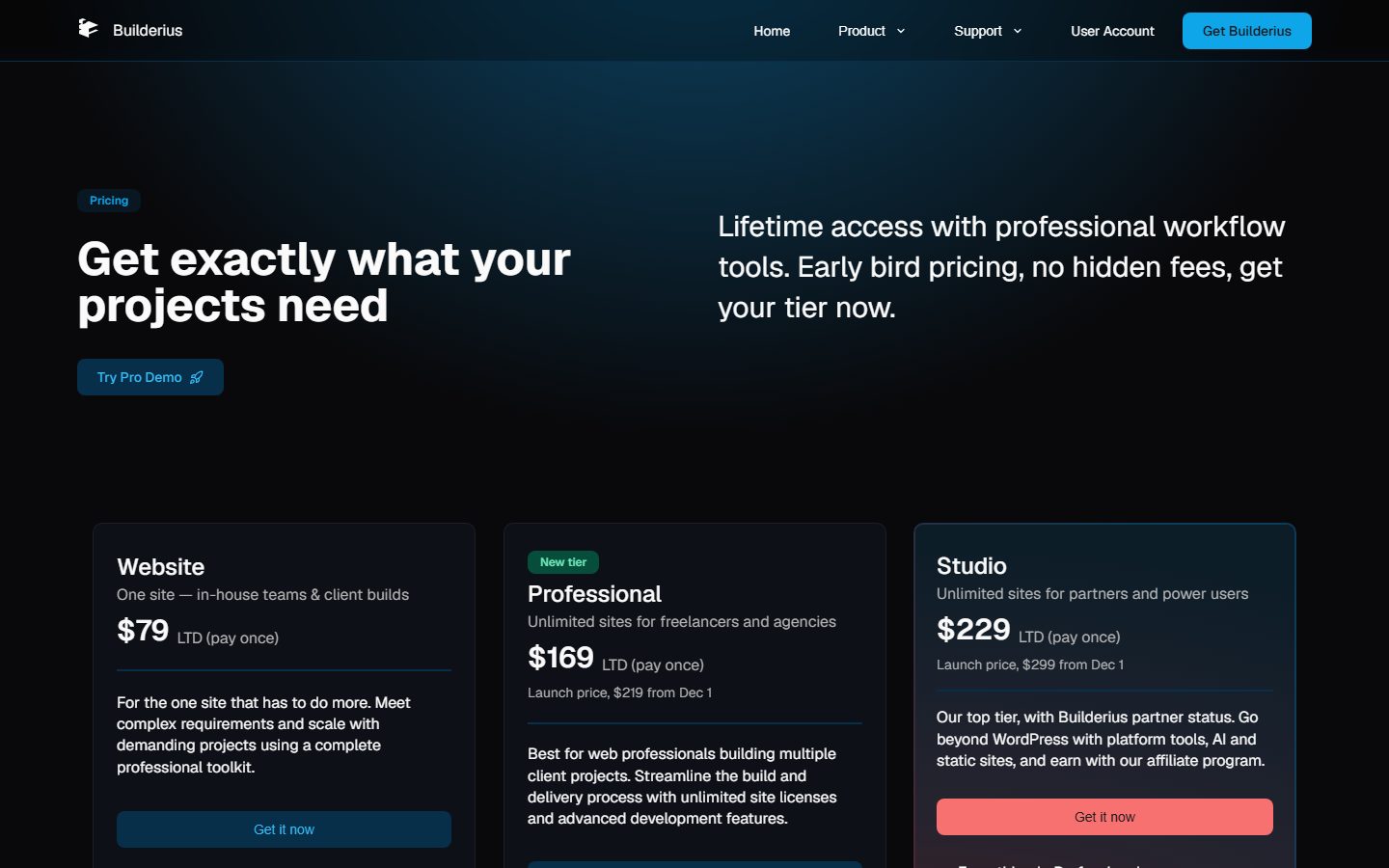
| Tier | Price now | Price from December 1 | Sites | Listed extras |
|---|---|---|---|---|
| Community | Free | Free | Personal sites and blogs | Core WordPress content, full visual control |
| Website | $79 | $79 (no change stated) | 1 site | Custom components, advanced queries with dynamic data, unrestricted code editing, team support |
| Professional | $169 | $219 | Unlimited | Everything in Website plus client handover with site keys |
| Studio | $229 | $299 | Unlimited | Everything in Professional plus platform tools, Sense AI, static site generation, code-to-builder import, affiliate program |
Terms from the pricing and support pages: no recurring fees; licences stay valid permanently; “updates and support continue for as long as Builderius exists”; a 30-day money-back guarantee described as “no questions asked”, with refunds equal to 90% of the payment because the remaining 10% covers payment processor fees; the licence has no restrictions on client use for Website, Professional or Studio (clients can buy their own licence or you can manage their sites with yours); and upgrades cost the difference between the current price of the target tier and what you originally paid. Early-bird Professional and Studio licences have no site limit. Studio holders get 40% reduced fees when selling on the Builderius marketplace, which is a planned feature on the roadmap. The page does not describe any renewal terms beyond the absence of recurring fees, and it does not define what happens if the company ceases operating; “as long as Builderius exists” is the vendor’s own wording and you should read it as exactly that.
The arithmetic below uses only the verified prices. The 90% refund figures are payment multiplied by 0.9.
| Scenario | Cost | Notes |
|---|---|---|
| Website licence for one site | $79 | Same total in year 1 and year 5 if no upgrade |
| Three client sites on Website licences | 3 x $79 = $237 | One licence per site |
| Professional bought before December 1 | $169 | Break-even against separate Website licences at 3 sites ($237) beats it at the third site; at 2 sites ($158) it is slightly more |
| Professional bought after December 1 | $219 | Break-even against Website licences at 3 sites ($237) still favours Professional |
| Studio bought before December 1 | $229 | $60 more than Professional at launch prices |
| Studio bought after December 1 | $299 | $80 more than Professional after the increase |
| Upgrade Website to Professional (launch) | $169 – $79 = $90 | Per the stated upgrade rule |
| Upgrade Website to Professional (after Dec 1) | $219 – $79 = $140 | Per the stated upgrade rule |
| Refund on a $79 / $169 / $229 purchase | $71.10 / $152.10 / $206.10 | 90% of payment, within 30 days |
A multi-year view is mostly an exercise in comparing a single payment with whatever your current tool charges per year. Because we have not verified other vendors’ prices for this article, use this framework with your own numbers: take the annual cost of your current builder licence across all the sites you maintain, multiply by the years you expect to keep working, and compare with the one-time Builderius price for the tier you need. As an illustration only (hypothetical numbers, not any vendor’s price): if you currently pay $X a year, the Professional tier at $219 breaks even after 219 divided by X years. At a hypothetical $100 a year that is a little over two years, and at $200 a year it is about one year. Then add the cost that does not appear on any pricing page: your hours of learning, rebuild time for existing sites, and the risk that a one-time-priced product’s economics change. A lifetime licence rewards you if the vendor survives and keeps shipping; it does not protect you if the vendor stops.
Our analysis on the pricing structure: the tier boundaries are driven by licensing scope (one site versus many), handover features and AI, not by builder capabilities in the narrow sense, since the documentation says the Website tier already has components, queries and the code editor. Freelancers working on client sites will probably look first at Professional. The launch pricing deadline of November 30 is real marketing pressure, and a 2022 podcast page noted lifetime pricing was planned before the Pro launch, so the lifetime model itself looks consistent over time. A third-party blog in February 2026 quoted an early-bird lifetime price of $179 for unlimited sites, showing that the price points have moved several times. Do not buy on deadline pressure if you have not run the evaluation below; the 90% refund window is your safety net but costs you 10% per attempt.
For broader pricing structure when you charge clients, see our freelance project pricing guide and the hosting side in the hosting guide by use case.
Migration into Builderius is documented in one direction only. The Import tool (Website, Professional and Studio, not Community) converts pasted HTML or Builderius JSON into native elements. It accepts a full page or a section including its style and script tags, preserves classes, IDs and attributes, and has options for importing CSS, JS, scripts, fonts and images. Image import is off by default, copies to the Media Library after confirmation, and is limited to 300 images and 12 MB per file. Inline JavaScript such as onclick handlers is blocked by default and the switch resets after each import. The post-import summary lists removed scripts, skipped SVGs containing scripts, sandboxed iframes, and dropped Alpine, Vue or htmx attributes (unsupported for now).
What that means in practice: you can bring in static HTML and CSS designs, such as output from a design tool or an AI, and get editable elements. We found no documented converter that reads another WordPress builder’s data (Elementor, Divi, Bricks and so on) directly. Content stored in posts and custom fields stays in the database either way; what you rebuild is the presentation layer. The theme page’s advice to migrate one location at a time is the most useful migration technique: start with a single template, leave the rest to the theme, and expand once you trust it.
Leaving Builderius is, on the documented design, easier than leaving many builders. Because styling is plain CSS in scopes, markup is semantic HTML with chosen tags, and the staging system exports releases as files, much of the design is portable. Dynamic data tags such as [[wp.post.title]] and Collection loops are Builderius-specific and would have to be rebuilt elsewhere. The static site generator is another exit, since a static export contains no builder dependency, though it freezes dynamic behaviour. Also check what happens to a page when the plugin is deactivated: the docs we read do not say, so test it on staging. Also review how to vet a WordPress plugin before installing it and apply the same rules to Builderius.
The lists below are our judgement, based on the documented design and the public record. They are not test results.
This section is deliberately brief and hedged. We have not tested any of these tools for this article, and other builders change quickly, so use it to decide what to check, not as a ranking. Our full comparison is in the page builder comparison guide, with alternatives to the largest builder in our Elementor alternatives roundup and a direct pairing in Bricks vs Elementor. For the tool WPMusk itself uses, read our Etch review. Etch is the tool we chose, which is a bias worth remembering.
| Question | Builderius, per its documentation | What to check on the alternative |
|---|---|---|
| Pricing model | One-time lifetime tiers, from $79 for one site | Whether the other vendor sells annual renewals or lifetime licences, and what happens to updates at expiry |
| Data layer | GraphQL editor, Collection loops, expression language | Whether queries are visual, PHP-based or GraphQL, and which field plugins are supported |
| Markup | You choose the tag for each element; plain CSS in scopes | The generated HTML of a simple section, in the browser’s inspector |
| Staging | Commits, releases, rollback and remote sync inside the builder | Whether staging depends on the host or a separate plugin |
| WooCommerce | Planned, not shipped, per the roadmap | Whether product, cart and checkout templates exist today |
| Ecosystem | Small; a planned marketplace; Facebook community | Number of templates, add-ons, tutorials and freelancers |
| AI | MCP connection to your own AI client, 74 abilities | Whether AI runs in the builder, needs vendor credits or uses an open protocol |
As broad contrasts, which you should verify on each vendor’s site: widget-oriented builders such as Elementor and Divi generally lead with prebuilt widgets, large template libraries and large communities, while Bricks, Breakdance, Oxygen, Etch and Builderius lean towards developer control. Within that group Builderius’s distinctive choices are GraphQL for data, built-in commit and release staging, a lifetime-licence model, and an MCP-first AI approach. Beaver Builder and Greenshift each have their own positioning (Greenshift is a block-based approach); check their current documentation before comparing. If you simply want a block theme and the core editor, our block theme roundup is the lighter path.
Do not decide on documentation alone, ours included. A single day is enough to learn whether Builderius fits your work, if you structure it. Use a staging copy or a local site, and keep the refund window and the launch-price deadline in mind.
| Time block | Task | What to record | Pass criterion (suggested) |
|---|---|---|---|
| Hour 1 | Install the free Community plugin on staging with PHP 8.2 or higher; follow the installation docs; load the Minimal Starter | Install problems, PHP and WordPress versions, plugin conflicts, browser used | Installs cleanly with no notices or errors on your host |
| Hours 2 to 3 | Rebuild one real template (a single post) and the header and footer as components; use Global variables, a class, and Template scope | Time taken, number of times you needed the docs, number of unexpected results | You reach a finished, responsive template without needing support |
| Hour 4 | Build a custom query (a related-posts or custom-post-type loop) with a Collection, using your real ACF or Meta Box fields (needs the paid tier you intend to buy) | Whether your field plugin works, query errors, pagination behaviour | Data renders correctly with correct fallbacks for empty values |
| Hour 5 | Embed a form with your existing form plugin via shortcode or HTML Code element; test submissions, spam handling and email delivery | Submissions received, styling conflicts | Form works end to end and passes keyboard use |
| Hour 6 | Create a commit, then a release, publish it, break something, roll back by publishing the older release; try Remote Sync to a second install if your tier supports it | Time to recover, anything left behind | Rollback restores the previous state with no manual repair |
| Hour 7 | Measure: compare the same page built in your current builder and in Builderius on the same host: HTML size, request count, LCP, INP, CLS, in several runs | Median values and variance; whether a page cache is active in each case | Builderius is no worse than your current page on your own pass thresholds |
| Hour 8 | Check SEO and accessibility: titles, canonicals, schema in your SEO plugin; headings; keyboard navigation and focus order; a screen reader pass on the menu | Defects found | No regressions against your current site |
| Optional | Connect Sense AI on staging with a scoped Application Password; commit first; ask for one template change; review the diff | Whether the result matches your class conventions | You are comfortable with the permissions you granted |
Also test on a throwaway site: deactivate the plugin and see what the front end shows; update from one release to the next if one is available; and test the editor in every browser your team uses. Write the numbers down, because a decision made from your own notes is easier to defend to a client or a team than one made from a review. For the performance steps, use the Core Web Vitals guide and the caching notes above.
Reasonable fit: developers and technical freelancers who think in classes, scopes and templates; agencies that want commits, releases and handover without a per-site subscription; builders who like GraphQL, or want to learn it, for dynamic data; teams already working with AI coding clients who want those agents to edit templates through MCP; and anyone building content sites, landing pages and custom-post-type-driven sites where WooCommerce is not central.
Poor fit, for now: online stores that need native WooCommerce template building; non-technical owners who want a visual template library and no code; Mac-only teams that cannot use anything other than Safari; organisations that require a long public track record, a large third-party ecosystem or a named, audited legal vendor; and projects where a form builder, mega menu or booking widget must work out of the box from documented elements.
Wait and watch: if you like the model but not the release-candidate label, the free Community version lets you follow the project until a stable 1.6 or later arrives. The roadmap’s planned items (WooCommerce, visual GraphQL IDE, custom elements, Gutenberg integration, collaboration) are what to watch for.
No. The WordPress.org readme says it works in its own environment, built with React, rather than as a block builder. A Gutenberg integration, letting you use Builderius templates and components in the block editor, appears on the roadmap as planned for Studio.
Yes. Community is on WordPress.org and the pricing page calls it free forever for personal sites and blogs. The docs list features it lacks: custom components, the Import tool, the JavaScript editor, mobile-first breakpoints and custom queries.
According to the pricing page, no. All paid plans are one-time purchases with “No recurring fees, ever”, and the vendor says updates and support continue for as long as Builderius exists. The page does not describe contract terms for the case where the company stops operating.
The pricing page says the licence has no restrictions on how you use Website, Professional or Studio, and that clients can buy their own licence or you can manage their sites with yours. The Website tier covers one site; Professional and Studio cover unlimited sites. Read the terms of use to confirm for your situation.
PHP 8.2 or higher and WordPress 6.0 or higher per the docs (WordPress.org lists 6.4 or higher). The builder needs a current Brave, Chrome, Firefox or Edge; Safari is not supported for the builder interface, although published sites work in Safari.
The docs say it works with classic, block and hybrid themes, because Builderius takes over only the locations you enable. It recommends building one location at a time. We did not verify any specific theme.
The roadmap lists WooCommerce support as planned for Website and above. We found no WooCommerce documentation, so we cannot say what works today. Ask the vendor if you run a store.
For built-in data (post fields on a post template) you do not. For custom queries you write GraphQL in the editor, with snippets, auto-completion and live preview. A visual Dynamic Data IDE is planned. The vendor also promotes AI tools as GraphQL teaching assistants.
Sense AI connects an MCP-capable AI client, such as Claude Desktop, Cursor or Claude Code, to your site, using a WordPress Application Password. You need Node.js 20 or newer and your own AI subscription or key; the docs say no separate Builderius API key is needed. Check which Builderius tier includes it before buying, because the docs and pricing page word this differently.
The vendor says its pages are lean and load faster than most builder sites, but the pages we read published no measurements and neither have we. Test with the plan above and with the metrics in our Core Web Vitals guide.
That is your call. The current release is a release candidate, and the 1.6-rc2 changelog lists several security and caching fixes, including one where a cache could serve one visitor’s page to another. The vendor also states that builder access is limited to administrators. Pilot it on a low-risk site, keep backups and update on staging first.
Releases can be exported as files and imported to another site, and the Studio tier lists static site generation. Styles are ordinary CSS. Builderius-specific dynamic data tags and loops would need rebuilding in another tool.
We cannot explain the vendor’s reasoning. The pricing page shows launch prices rising on December 1, and an earlier third-party article quoted a different early-bird price, so price points have moved. Confirm the price at checkout.
Only if the evaluation passes. Launch pricing ends November 30, according to the pricing page, and the refund is 90% of payment within 30 days, so a failed purchase costs you the 10% fee. A cheaper approach is to test the free Community plugin first and buy on the day your evaluation tells you to.